
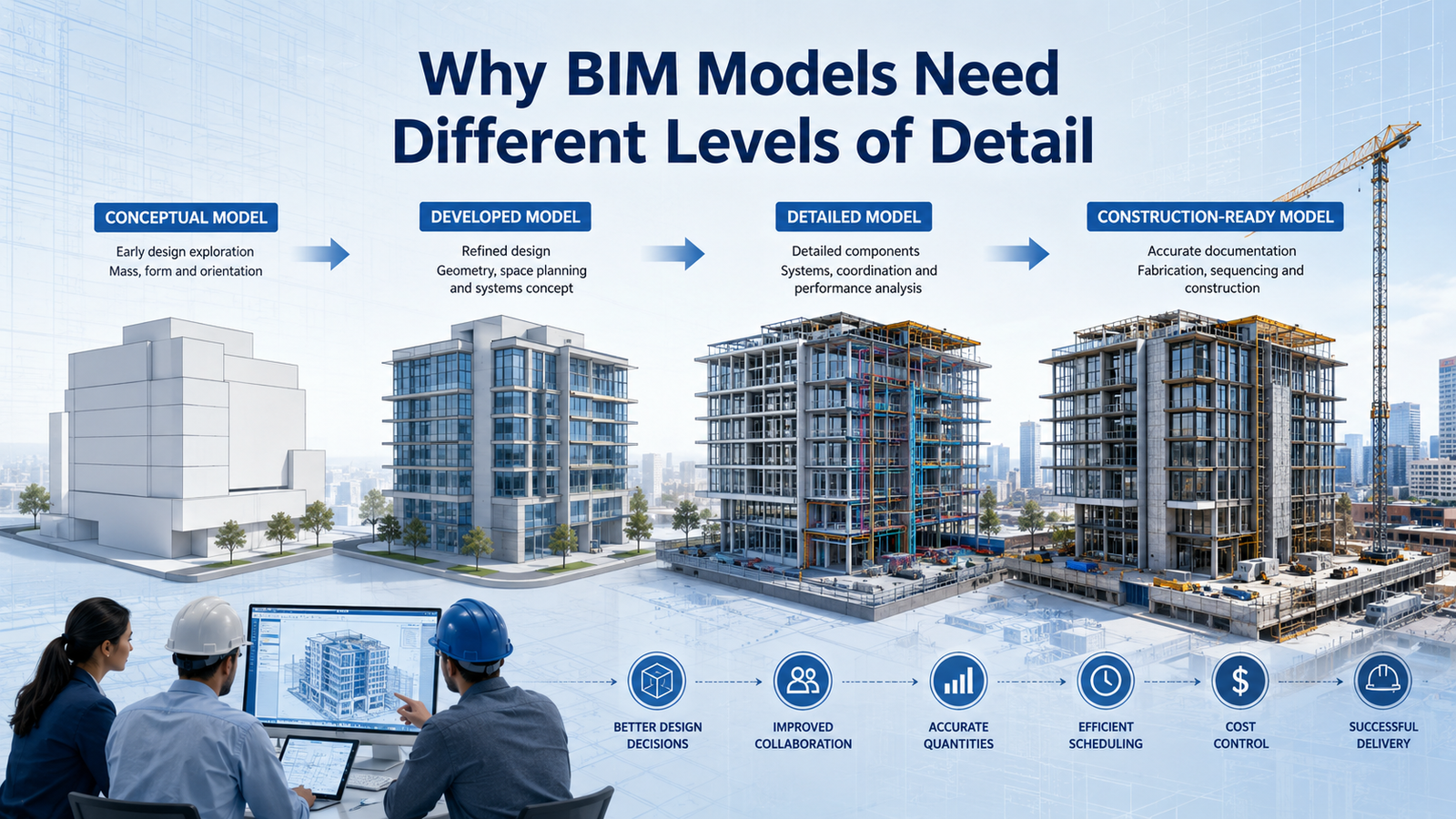
Imagine two engineers looking at the same BIM model.
One believes the model is ready for construction. The other believes it is still only suitable for design discussions.
Both engineers are looking at the same project, yet they have completely different expectations.
This situation is surprisingly common in construction projects and is one of the main reasons why the concept of Level of Development (LOD) in BIM was introduced.
LOD helps define exactly how detailed, accurate, and reliable a BIM model is at a particular stage of a project. It ensures that architects, structural engineers, MEP engineers, contractors, and project managers all understand what information can be trusted and how it should be used.
Without clear LOD definitions, misunderstandings can lead to design conflicts, construction delays, and costly project mistakes.
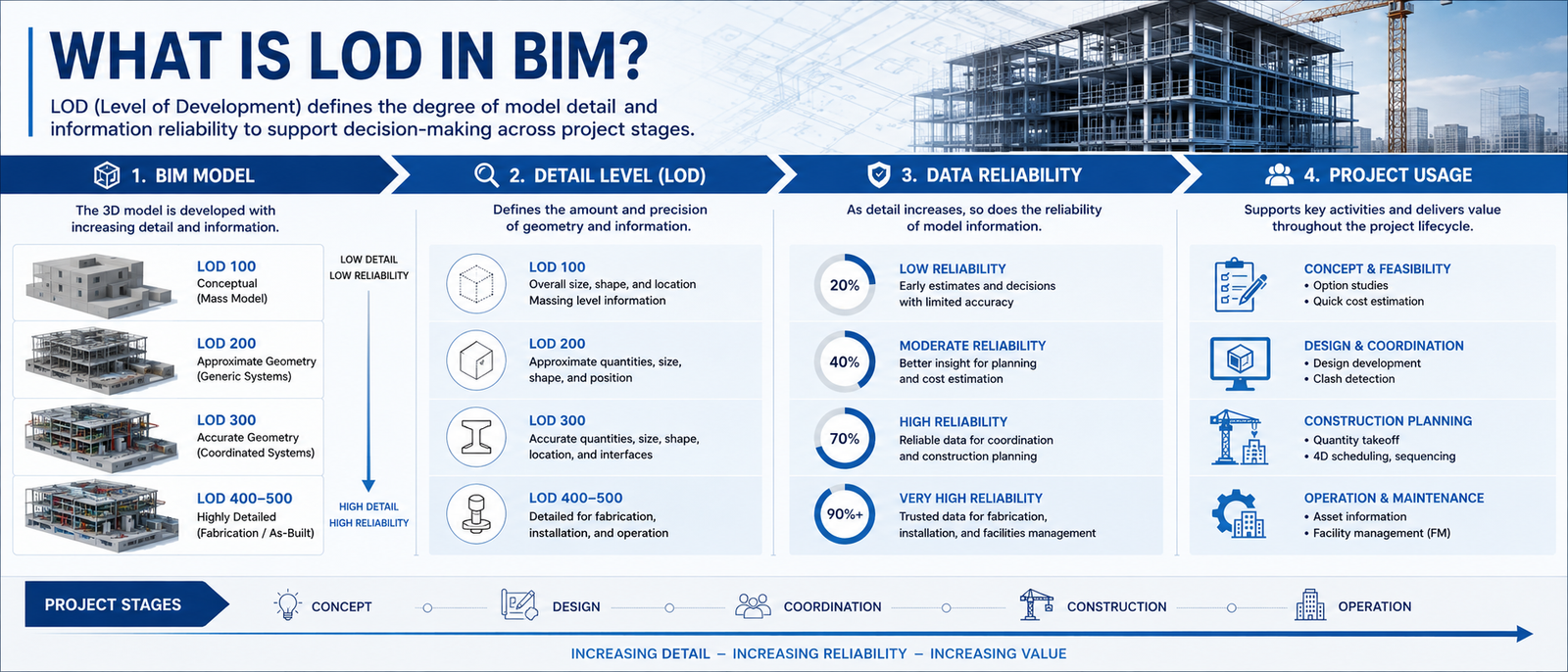
LOD stands for Level of Development and refers to the amount of detail, accuracy, and reliability contained within a BIM model.
Many beginners assume LOD only relates to visual appearance. In reality, LOD defines how much confidence project teams can place in the information contained within the model.
A BIM model is not valuable simply because it looks detailed. It becomes valuable when the information inside the model is accurate enough to support project decisions.
This concept plays a major role in Real-World BIM Project Workflows, where multiple teams rely on the same model throughout design and construction.
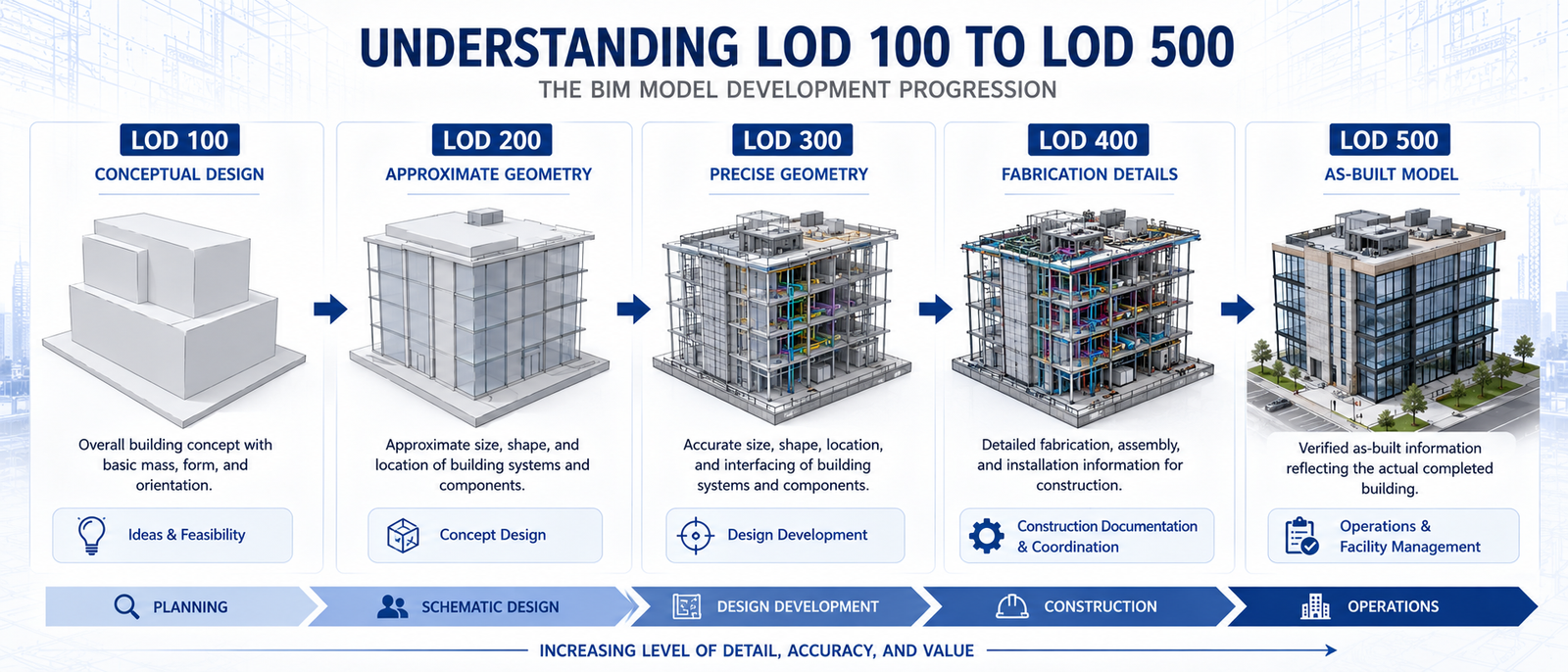
LOD 100 represents the earliest stage of a project. Models contain basic forms, approximate sizes, and conceptual information used for feasibility studies and planning.
At this level, model elements include approximate quantities, sizes, locations, and orientations. Teams begin developing a clearer understanding of project requirements.
LOD 300 models contain accurate dimensions, locations, and quantities. Information is reliable enough for creating construction documentation.
LOD 400 includes fabrication, assembly, installation, and manufacturing details. Contractors and fabricators often rely on this level during execution.
LOD 500 represents the final constructed condition of the project. It contains verified information reflecting what was actually built on site.
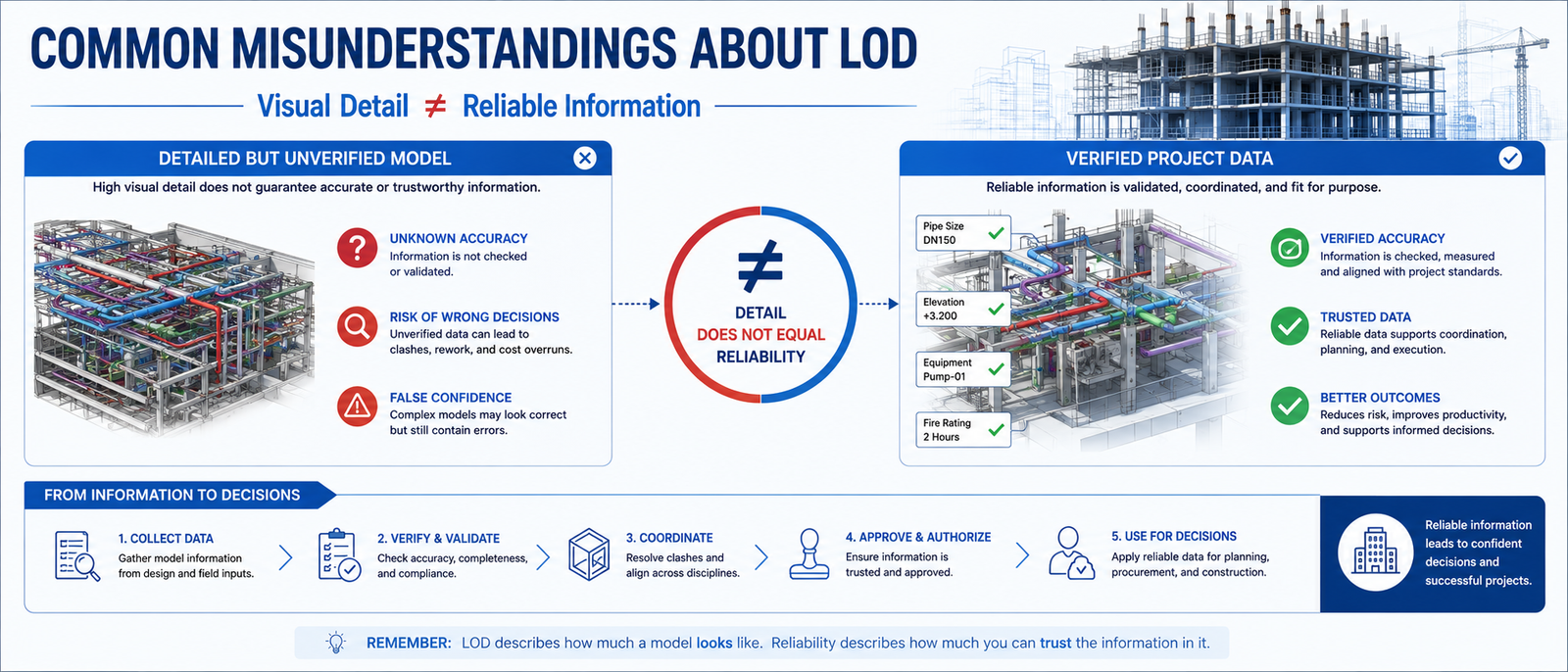
One of the most common mistakes BIM beginners make is assuming that LOD only refers to graphical detail.
In reality, LOD is equally concerned with information accuracy and reliability.
A highly detailed model may look impressive, but if the information has not been verified, it can still create project risks.
This is why project teams evaluate both visual detail and information reliability when determining a model’s LOD.
The goal is not simply to create more detailed models. The goal is to create models that provide reliable information for decision-making.
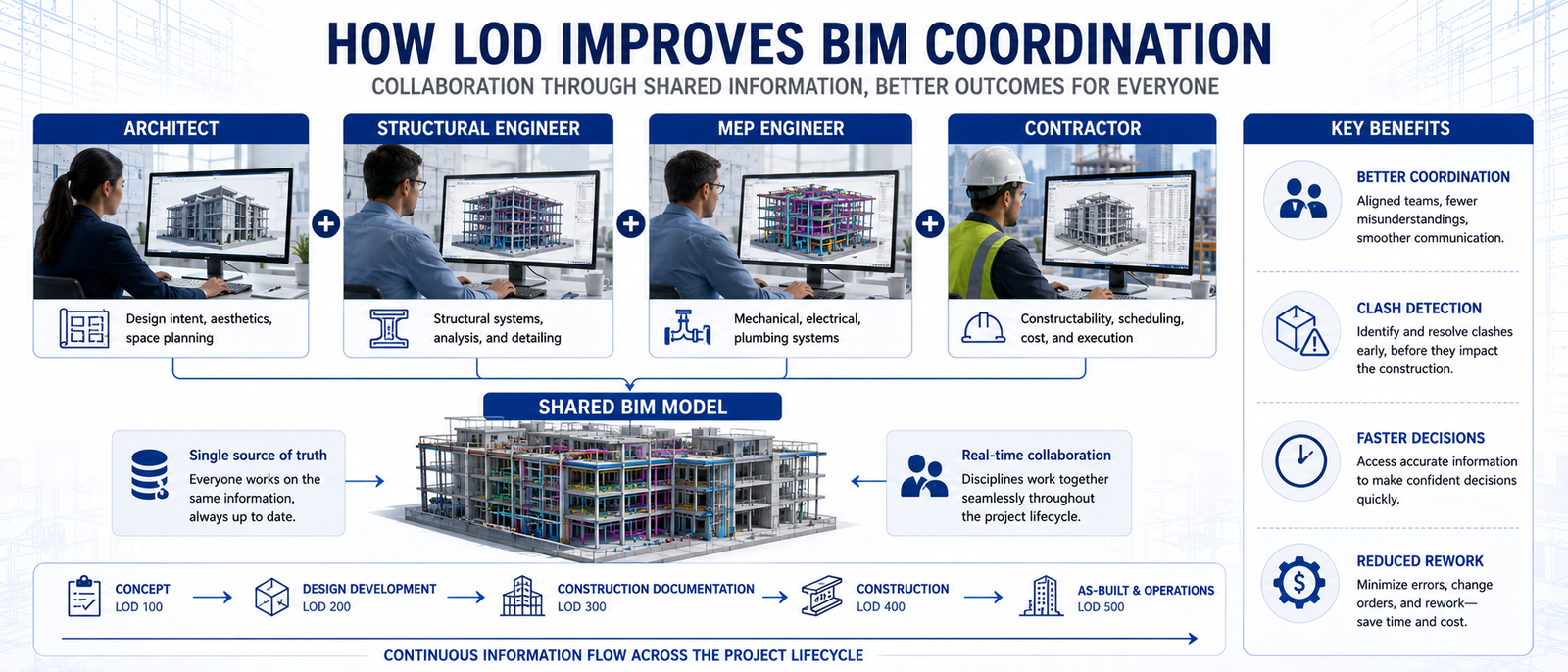
Construction projects involve multiple disciplines working together simultaneously.
Architects, structural engineers, MEP engineers, contractors, and project managers all rely on BIM information to perform their tasks.
LOD provides a clear understanding of what information is available and how reliable it is.
This helps teams avoid misunderstandings, improve coordination, and identify clashes earlier in the project lifecycle.
Effective coordination is a major part of Complete BIM Workflows, where multiple disciplines collaborate using shared project data.
As BIM adoption continues to grow, understanding LOD becomes increasingly important for civil engineers and BIM professionals.
Modern BIM software helps engineers develop models progressively while maintaining control over information quality.
Tools such as Revit allow project teams to manage model development through different LOD stages and ensure information remains accurate throughout the project lifecycle.
Learning how to manage model development effectively is a critical part of BIM Skills for Civil Engineers.
Level of Development (LOD) is much more than a BIM terminology. It is a framework that helps teams understand how reliable and usable a BIM model is at every stage of a project.
By properly understanding LOD 100, 200, 300, 400, and 500, engineers can improve communication, reduce misunderstandings, and achieve better project outcomes.
As BIM continues to become the standard approach for construction projects, understanding LOD is becoming an essential skill for future-ready civil engineers.
At 4Dimensions Infotech Pune, students gain practical experience using BIM tools, project coordination workflows, and industry-standard modeling techniques.
Whether you are looking for a Revit Course in Pune, BIM Training, Civil 3D Training, or advanced BIM project workflows, understanding LOD is one of the most important skills you can develop.
👉 Start building your BIM expertise and prepare for real-world engineering projects.
1. What does LOD stand for in BIM?
LOD stands for Level of Development and defines the detail and reliability of a BIM model.
2. Why is LOD important?
It improves coordination, reduces misunderstandings, and helps teams make decisions using reliable project information.
3. What is the difference between LOD 300 and LOD 400?
LOD 300 contains accurate geometry, while LOD 400 includes fabrication and installation details.
4. Does a higher LOD always mean a better model?
No. The model should contain the appropriate level of development for the project stage.
5. Which software is commonly used for BIM?
Revit is one of the most widely used BIM platforms for model creation and management.
6. How can I learn BIM effectively?
By combining software training with real project workflows, coordination practices, and practical BIM applications.
© 2025 4Dimensions Infotech. All rights reserved. | Best Design Engineering Training Institute in Pune
Start your journey with the best design engineering training institute in Pune.